
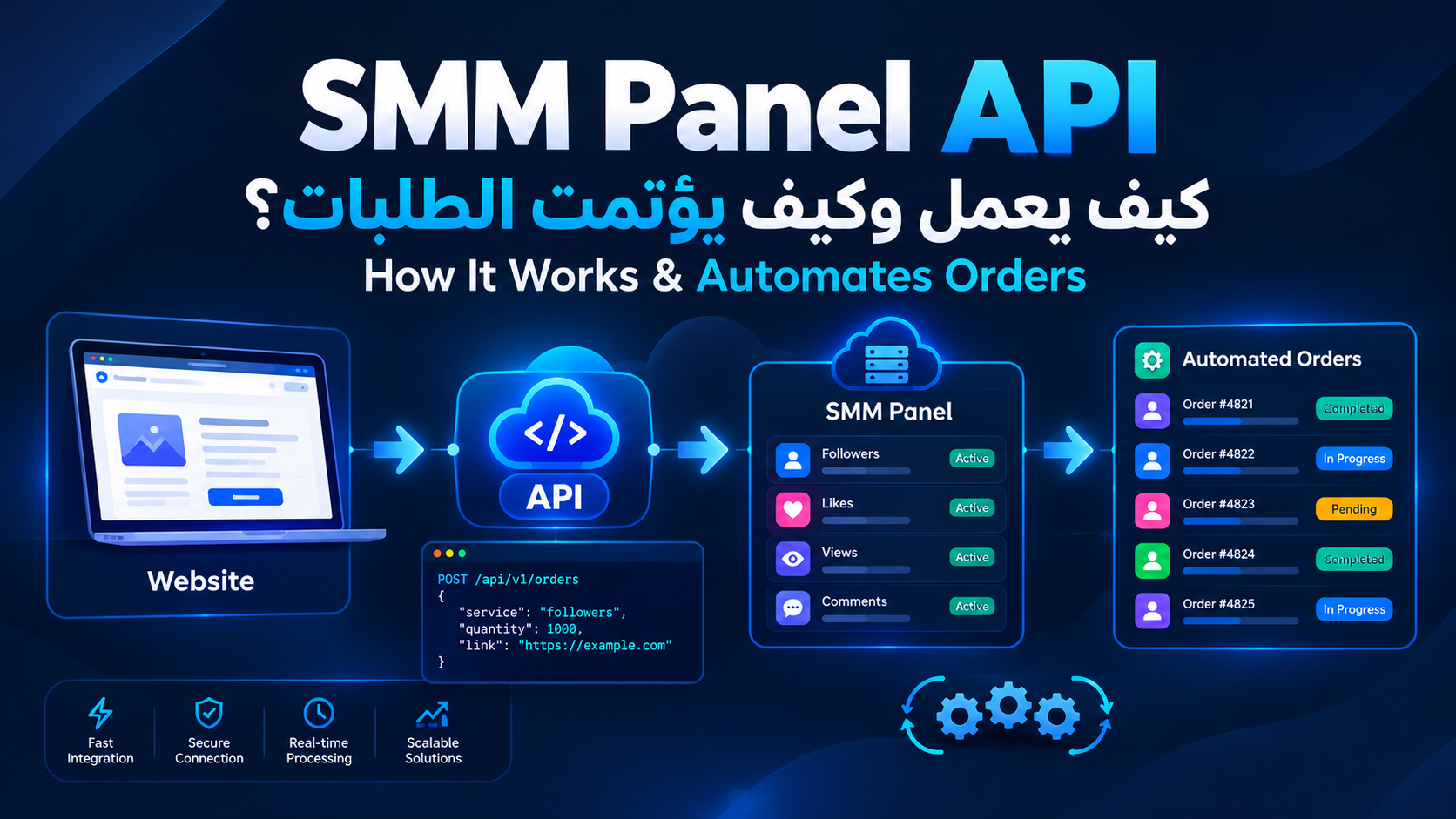
SMM Panel API: How It Works and How to Automate Orders
Running an SMM reseller business manually can become difficult as your number of customers and orders grows.
You may need to check services, submit orders, track their status, update prices, and manage customer requests every day.
This is where an SMM Panel API can make a major difference.
An API allows your website, application, or internal system to communicate with an SMM panel programmatically. Instead of manually copying every customer order into another dashboard, your system can send and manage supported operations automatically.
In this guide, smmfedex explains what an SMM Panel API is, how it works, what you can use it for, and what to look for when choosing an API provider.
What Is an SMM Panel API?
An SMM Panel API is a software interface that allows another application or website to communicate with an SMM panel.
API stands for Application Programming Interface.
In simple terms, an API acts as a communication layer between two systems.
For example, your website may receive an order from a customer. Instead of manually submitting that order to an SMM panel, your website can send the required information through the API.
A simplified process looks like this:
Customer → Your Website → SMM Panel API → Service Provider → Order Status
Depending on the provider, the API may allow you to retrieve services, submit orders, check order status, check account balance, and perform other supported actions.
The exact features depend on the SMM panel and its API documentation.
How Does an SMM Panel API Work?
The basic process is relatively simple.
An SMM panel provides API access to authorized users. The system normally provides an API key or another authentication method.
Your website or application then uses that authentication information to communicate with the panel.
A typical order flow may look like this:
A customer places an order on your website.
Your system validates the order information.
Your system sends the required data to the SMM Panel API.
The panel processes the request.
The API returns an order ID or response.
Your system stores the order information.
Your system can request the order status later.
This removes much of the repetitive manual work involved in processing orders.
What Can You Do With an SMM Panel API?
API capabilities vary between providers, but several functions are common.
1. Retrieve Available Services
Your system may be able to request a list of available services from the panel.
The response can include information such as:
Service ID
Service name
Category
Price
Minimum order
Maximum order
Service description
Refill availability
Cancellation availability
This information can be used to build or update your own service catalog.
2. Submit Orders Automatically
One of the main reasons businesses use an SMM API is automated order submission.
When a customer purchases a service from your website, your system can send the required information to the provider without requiring someone to manually copy the order.
The request may contain information such as:
Service ID
Target URL
Quantity
Additional parameters required by the service
The provider then returns a response indicating whether the request was accepted.
3. Check Order Status
After submitting an order, your system may need to know what happened to it.
If the API supports status checking, your website can periodically request the current status.
Common status names may include:
Pending
Processing
Completed
Partial
Canceled
Failed
The exact status names and meanings can differ between providers.
For this reason, developers should always follow the specific API documentation of the provider they are integrating.
4. Check Account Balance
Some SMM APIs allow applications to retrieve the current account balance.
This can be useful when you operate an automated reseller system.
For example, your system could monitor the available balance and alert you when it becomes too low to process new orders.
5. Additional API Features
Depending on the provider, an API may also support features such as:
Refill requests
Order cancellation
Drip-feed orders
Multiple order status requests
Order history
Service synchronization
However, these features are not available from every provider.
Having an API does not automatically mean that all of these functions are supported.
SMM Panel API vs Manual Orders
The biggest difference is automation.
With manual ordering, someone has to log into the panel, select a service, enter the target information, submit the order, and check its status.
With an API integration, software can perform many of these operations automatically.
| Manual Ordering | SMM Panel API |
|---|---|
| Requires human input | Can be automated |
| Better for a small number of orders | Better for larger order volumes |
| Data is copied manually | Data can be transferred automatically |
| Status checks are manual | Status checks can be automated |
| Limited by staff availability | Can run continuously |
| More repetitive work | Less repetitive work |
However, an API is not automatically the better choice for everyone.
If you only process a few orders, manual ordering may be simpler.
If you operate a website with many orders, automation can become much more valuable.
Who Needs an SMM Panel API?
SMM Panel Owners
If you operate an SMM service website, an API can help automate order processing between your website and service providers.
Instead of manually forwarding customer orders, your system can submit supported orders automatically.
SMM Resellers
Resellers are one of the main groups that can benefit from API integration.
A reseller can connect their own website or ordering system to an SMM provider and automate the process of forwarding customer orders.
This can make it easier to handle a larger number of customers without increasing manual work at the same rate.
Digital Marketing Agencies
Agencies managing multiple clients may use automation to organize repetitive service orders and tracking tasks.
An API can become part of an internal workflow when an agency needs to manage many requests across different clients.
Developers
Developers can use SMM APIs to build systems such as:
SMM service websites
Reseller platforms
Custom dashboards
Order management systems
Bots
Internal automation tools
Mobile or web applications
The possibilities depend on the API features provided by the service.
Are All SMM Panel APIs the Same?
No.
This is one of the most important things to understand before choosing a provider.
Two SMM panels may both advertise API access while offering very different capabilities.
One provider may support:
Service lists
Add order
Order status
Balance
Another may also support:
Refill
Cancel
Drip-feed
Bulk status checks
Additional automation features
Authentication methods, request formats, rate limits, response formats, and error handling can also differ.
Therefore, never choose an API based only on the word "API".
Always read the provider's documentation before building an integration.
What Should You Look for in an SMM Panel API?
Choosing an API provider requires more than comparing prices.
Here are some of the most important factors.
1. Clear API Documentation
Good documentation makes development much easier.
Look for clear explanations of:
Authentication
Endpoints
Required parameters
Response formats
Error messages
Rate limits
Available operations
Poor documentation can turn a simple integration into a difficult development project.
2. Reliable Service
An API can be technically well designed but still be difficult to use if the underlying service is unstable.
Look at the provider's reliability and how it handles service interruptions.
3. Service Availability
Make sure the API actually provides the services you need.
Do not assume that every panel offers the same social media platforms or service types.
4. Accurate Service Information
If your website displays service prices, limits, and descriptions, you need a reliable way to keep that information updated.
Outdated service information can lead to incorrect orders and customer problems.
5. Order Status Support
Status tracking is particularly important for automated systems.
Your website should be able to determine what happened to an order after it was submitted, assuming the provider supports status requests.
6. Error Handling
Your system should know how to handle situations such as:
Insufficient balance
Invalid service ID
Invalid target
Quantity outside the allowed range
Temporarily unavailable service
API authentication failure
Connection errors
A good integration should not assume that every request will succeed.
7. API Key Security
Your API key should be treated as sensitive information.
Never expose it in public JavaScript, public repositories, screenshots, or client-side code.
For most custom integrations, sensitive API communication should be handled on the server side.
Is an SMM Panel API Safe?
An API is simply a way for software systems to communicate.
Its security depends on both the provider and the way your integration is built.
Important security practices include:
Use HTTPS.
Keep API credentials private.
Store secrets securely.
Avoid exposing API keys in frontend code.
Validate customer input.
Log errors without exposing sensitive credentials.
Monitor unusual requests.
Rotate credentials if they are compromised.
You should also make sure that the services you provide comply with the rules and policies of the social media platforms involved.
Do You Need a Developer to Integrate an SMM Panel API?
If you want a custom integration, you will usually need someone who understands APIs and backend development.
The API itself is only the communication layer.
Your system still needs to decide:
When to submit an order.
What data to send.
Where to store the order ID.
How to handle errors.
How to update order status.
How to calculate customer pricing.
What happens when a service price changes.
What happens when the provider balance is insufficient.
Some ready-made platforms make integration easier, but custom websites generally require backend development.
A Simple Example of an SMM API Integration
Imagine you operate an SMM reseller website.
The workflow could look like this:
Customer
↓
Your Website
↓
Order Management System
↓
SMM Panel API
↓
Service Provider
The customer submits an order through your website.
Your system validates the order and sends the required information through the API.
The provider returns an order ID.
Your system stores that external order ID together with the customer's internal order ID.
Later, your system can request the current status and update the customer-facing order page.
This is the basic architecture behind many automated reseller systems.
Common SMM Panel API Mistakes
Exposing the API Key
Never place private API credentials somewhere that customers can access them.
Sending Large Volumes of Orders Without Testing
Always test the integration before sending large numbers of live requests.
Ignoring API Errors
A reliable system must know what to do when a request fails.
Not Saving the Provider's Order ID
The external order ID is important because it connects your internal order with the provider's system.
Using Outdated Service Data
Services, prices, limits, and availability can change.
Your system should be designed to handle those changes.
Is an SMM Panel API Suitable for Beginners?
If you only want to place a few orders manually, you probably do not need an API.
But if you want to build a:
Reseller website
SMM service platform
Automated order system
Custom dashboard
Service marketplace
then understanding API integration becomes much more useful.
You do not need to become an expert programmer just to understand the concept.
You mainly need to understand how information moves between your website and the service provider.
SMM Panel API vs Panel Dashboard: Which Is Better?
There is no single answer.
Use the dashboard when:
You process a small number of orders.
You do not need automation.
You do not have a custom website.
You want to start quickly.
Use an API when:
You operate a website.
You receive many orders.
You want automated processing.
You need automated status tracking.
You operate an SMM reseller business.
You want to connect multiple systems.
In simple terms:
A dashboard is designed for manual management, while an API is designed to let software interact with the panel automatically.
Frequently Asked Questions About SMM Panel APIs
What is an SMM Panel API?
An SMM Panel API is a software interface that allows a website or application to communicate with an SMM panel and perform supported operations programmatically.
Can I use an API to build an SMM website?
Yes. An API can be used as part of an SMM website's order-processing system. However, you will also need customer management, order management, payment processing, a database, and other website components.
Does every SMM Panel provide an API?
No. API availability and functionality depend on the provider.
Can an SMM Panel API place orders automatically?
Yes, if the provider supports order creation through its API.
Can I check order status through an API?
Many providers support status checking, but the available functions depend on the specific API.
Is an SMM Panel API free?
API access may be included with an account, while some providers may have specific conditions, limits, or fees. Always check the provider's current terms.
Do I need a developer?
For a custom integration, you will generally need someone with API and backend development experience.
Is an API key important?
Yes. An API key can provide access to your account and should be stored securely and never exposed publicly.
Final Thoughts
An SMM Panel API can turn a manual reseller workflow into a more automated system.
Instead of manually transferring every customer order, your website can communicate directly with the SMM panel, submit supported orders, retrieve service information, and track order statuses.
For small-scale manual use, a standard panel dashboard may be enough.
For websites, resellers, agencies, and businesses handling larger order volumes, API integration can save repetitive work and create a more scalable workflow.
Before choosing a provider, do not look only at the API label or the lowest price.
Check the documentation, supported operations, reliability, service availability, error handling, security practices, and the features your business actually needs.
That is what makes an API useful—not simply having an API endpoint.